Recommendation
To ensure a clear and organized structure for conducting experiments, we recommend the separation of concerns. This is accomplished by dividing the experiment assets into three categories: experiment definition, execution, and outputs.
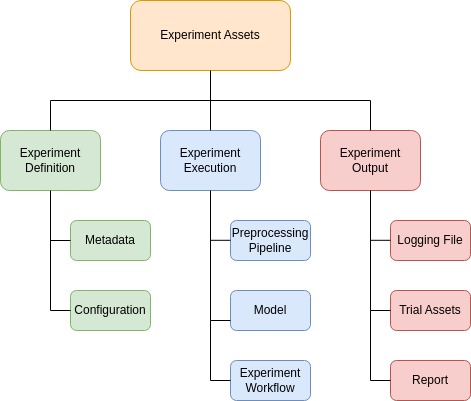
The following sections detail the implementation of these three categories and demonstrate an experiment using the MNIST Digits dataset [1]. To follow along, create a dedicated directory for your experiment. For real-world examples, see the ImageMLResearch demo directory.
Defining an Experiment
The experiment definition includes all the elements that describe the experiment setup, such as metadata (name, directory, sorting metric) and trial configurations. These details are stored in a JSON file called definition.json within the experiment directory. Below is an example you can use as a template for defining your own experiment.
{
    "experiment_metadata": {
        "name": "MNIST Digits Experiment",
        "description": "A neural network is trained with different hyperparameters to classify MNIST digits.",
        "directory": "PATH/TO/EXPERIMENT_DIRECTORY",
        "sort_metric": "accuracy"
    },
    "trial_definitions": [
        {
            "name": "Trial 1",
            "hyperparameters": {
                "units1": 128,
                "units2": 64,
                "learning_rate": 0.001
            }
        },
        {
            "name": "Trial 2",
            "hyperparameters": {
                "units1": 256,
                "units2": 128,
                "learning_rate": 0.001
            }
        }
    ]
}
To load the trials, use the load_experiment_definition() function inside the utils module. This function reads the experiment metadata and trial configurations from the JSON file. The function signature is as follows:
- load_experiment_definition(definition_json)
Loads experiment metadata and trial definitions from a JSON file.
- Parameters:
definition_json (str) – The path to the JSON file containing the experiment definition.
- Returns:
A tuple containing:
experiment_metadata (dict) – Experiment metadata including name, description, and directory.
trial_definitions (iterator) – An iterator for generating trial definitions.
The JSON file is expected to contain two keys:
experiment_metadata(dict): Contains metadata about the experiment.trial_definitions(list or dict): Specifies trial definitions, either as a list of predefined trials (see example above) or a configuration for generating them automatically (see Hyperparameter Tuning).
Executing the Experiment
Overview
The experiment execution establishes the actual experiment workflow, encompassing:
Data loading
Data preparation and preprocessing
Model creation and training
Plotting and evaluation
To maintain reproducibility, it is recommended to design the experiment workflow within a single Python script, leveraging the framework’s capabilities. The recommended name for this script is execution.py. It should reside in the experiment directory and be exclusively used for the specific experiment.
Workflow
The code above demonstrates a complete execution script for the MNIST Digit experiment:
Steps:
Load the dataset and reshape it to include three channels.
Convert the dataset to the TFDS format.
Apply a preprocessing pipeline (e.g., reversing the scaling of pixel values).
Execute trials sequentially, where each trial:
Creates, trains, and evaluates a neural network for a specific hyperparameter combination.
Generates experiment outcomes, including the experiment report, using the underlying framework.
Implementation Example
# execution.py
import os
import tensorflow as tf
from imlresearch.utils import load_experiment_definition
from imlresearch.preprocessing_steps import ReverseScaler, TypeCaster
from imlresearch.researcher import MultiClassResearcher

def load_dataset():
    (X_train, Y_train), (X_test, Y_test) = tf.keras.datasets.mnist.load_data()
    X = tf.concat([X_train, X_test], axis=0)
    X = tf.stack([X] * 3, axis=-1)
    Y = tf.concat([Y_train, Y_test], axis=0)
    Y = tf.one_hot(Y, 10)
    dataset = tf.data.Dataset.from_tensor_slices((X, Y))
    return dataset

def create_preprocessing_pipeline():
    return [ReverseScaler(255), TypeCaster(output_dtype="float32")]

def make_model(hyperparameters):
    model = tf.keras.models.Sequential(
        [
            tf.keras.layers.Input(shape=(28, 28, 3)),
            tf.keras.layers.Flatten(),
            tf.keras.layers.Dense(hyperparameters["units1"], activation="relu"),
            tf.keras.layers.Dense(hyperparameters["units2"], activation="relu"),
            tf.keras.layers.Dense(10, activation="softmax"),
        ]
    )
    model.compile(
        optimizer=tf.keras.optimizers.Adam(
            learning_rate=hyperparameters["learning_rate"]
        ),
        loss="categorical_crossentropy",
        metrics=["accuracy"],
    )
    return model

def make_experiment(experiment_metadata, trial_definitions):
    # Experiment Setup
    researcher = MultiClassResearcher(
        class_names=["Digit " + str(i) for i in range(10)]
    )
    dataset = load_dataset()
    researcher.load_dataset(dataset)
    preprocessing_pipe = create_preprocessing_pipeline()
    researcher.apply_preprocessing_pipeline(preprocessing_pipe)
    researcher.prepare_datasets(batch_size=32, shuffle_seed=42)
    researcher.split_dataset(train_split=0.8, val_split=0.1, test_split=0.1)

    # Experiment Execution
    with researcher.run_experiment(**experiment_metadata) as experiment:
        for trial_definition in trial_definitions:
            with experiment.run_trial(**trial_definition) as trial:
                if trial.already_runned:
                    continue
                model = make_model(trial_definition["hyperparameters"])
                researcher.set_compiled_model(model)
                researcher.fit_predict_evaluate(
                    epochs=10, steps_per_epoch=32, validation_steps=32
                )
                researcher.plot_model_summary()
                researcher.plot_training_history(title="Training History")
                researcher.plot_results(grid_size=(4, 3), prediction_bar=True)

if __name__ == "__main__":
    json_path = os.path.join(
        os.path.dirname(os.path.abspath(__file__)), "definition.json"
    )
    experiment_metadata, trial_definitions = load_experiment_definition(json_path)
    make_experiment(experiment_metadata, trial_definitions)
Experiment Outputs
The experiment results are stored in the output folder, generated for each experiment. Key files include:
experiment_info.json: Contains experiment-specific metadata, figure paths, and trial names.execution.log: Tracks experiment progress.experiment_report.md: Automatically generated experiment report.analysis.md(optional): Analysis performed by ChatGPT (enabled viaask_for_analysis=Truein theExperimentclass).hparams_suggester_study.db(optional): Hyperparameter optimization study by Optuna (enabled in case trials are generated automatically, find more in Hyperparameter Tuning).
Each trial has its own folder containing:
trial_info.json: Trial-specific metadata and figure paths, training history, and evaluation metrics.*.png: Figures generated and tracked during the trial.
Below is the folder structure of the experiment assets for the MNIST Digits experiment:
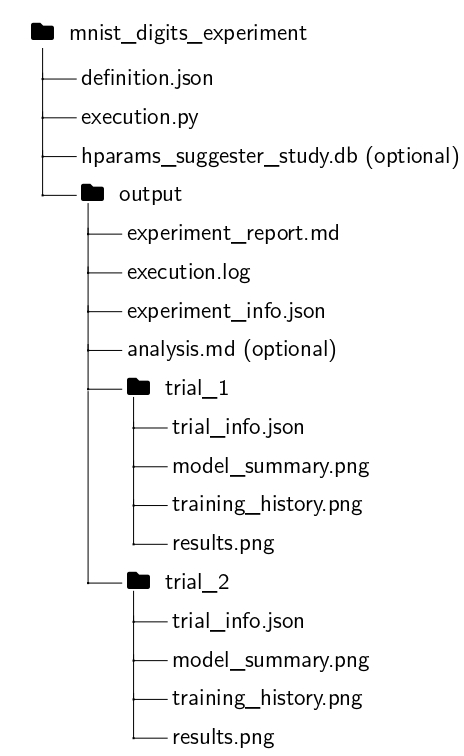
The experiment report consolidates data from _info.json files and figures into a structured summary. The definition.json and execution.json files, along with the output folder, form the complete set of experiment assets. Download the generated report for the MNIST Digits experiment from the following link:
Hyperparameter Tuning
To leverage hyperparameter tuning, the framework builds on Optuna, a hyperparameter optimization library. To use this feature, the definition.json file should contain a configuration for generating trials automatically. The trial_definitions key should include hparams_configs, where you can specify the hyperparameters to tune and their respective search spaces. Additionally, you need to specify the number of trials to run using the num_trials key.
The following hyperparameter types are supported:
int: Specifies a range of integer values with the following attributes:
low: The minimum value.high: The maximum value.step: The increment step between values.nearest_power2(optional, default:false): Whether to compute the nearest power of 2.
float: Specifies a range of floating-point values with the following attributes:
low: The minimum value.high: The maximum value.log(optional, default:false): Whether to sample logarithmically.
categorical: Defines a set of discrete choices, where each trial selects a value from the specified list.
choices: A list of possible categorical values.
Below is an example of an automatic trial configuration for the MNIST Digits experiment:
{
"experiment_metadata": {
    "name": "MNIST Digits Experiment",
    "description": "In this experiment, a neural network is trained with different hyperparameters to classify MNIST digits.",
    "directory": "demo/mnist_digits_experiment_auto",
    "sort_metric": "accuracy"
},
"trial_definitions": {
    "hparams_configs": {
    "units1": {
        "type": "int",
        "low": 32,
        "high": 128,
        "step": 32,
        "nearest_power2": true
    },
    "units2": {
        "type": "int",
        "low": 32,
        "high": 128,
        "step": 32,
        "nearest_power2": true
    },
    "learning_rate": {
        "type": "float",
        "low": 1e-3,
        "high": 1e-1,
        "log": true
    }
},
"num_trials": 10
}
}
The generated report for the MNIST Digits experiment with automatic trial configuration can be downloaded from the following link: